Scratch Piano Activity Pack What will you need?
The Scratch website. It is free to use and works on all devices.
What will you learn?
Program a piano in Scratch using:
– Piano key sprites.
– Keyboard or touch screen inputs for playing the keys.
1.Drawing a piano key sprite
Watch the video to learn how to use the Scratch painting tools to make a piano key sprite.
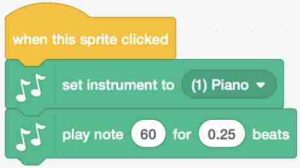
2. Programming the touch/click inputs and piano note outputs
Watch the video to learn how to program the piano key sprite using the code below and the music extension blocks to play the note of C when the key is clicked or tapped on a touch screen.
3. Duplicate piano key sprites to add more notes
Watch the video to learn how to duplicate the C note sprite to program the other white notes to make an octave (8 notes). The order is C,D,E,F,G,A,B,C
4. Program the sharps and flats (black notes)
Watch the video to learn how to create the sharp and flat notes (black notes) using the skills you have already used.
Improve it
Could you add labels to the notes to help people learn what they are?