What will you learn? Use an online Python editor to program in Python, including: – Write basic python syntax – Print text – Use Python as a calculator – Program loops to repeat text – Program interactive inputs
– Program a trivia chatbot using ‘send message’ functions (challenge)
Python is a type of programming language (different from Java, HTML etc). It is a text-based language and allows you to program short commands quickly. It is a powerful language used by many famous services, such as Google (Youtube), Netflix, Facebook, Instagram and NASA. You will need to type the commands correctly or the program will not work.
What is Python? This video demonstrates how and why Python is used to program different software and websites. It also includes tips for programming in Python yourself.
1. Use Python Syntax Toxic Jungle Watch this video which covers the first 3 levels of Toxic Jungle. It demonstrates how to write direction commands in Python (known as Syntax rules). Then try the levels yourself.
Code Combat This video tutorial describes how to use the Code Combat website to write basic Python syntax to complete a series of challenges.
Using the Python editor
You can use the Python editor to type the code on the left and then click run to see it on the right. This video demonstrates how to use the editor and also share a link to each of your programs for the next 5 tasks.
2. Print text Open the Python editor and use the print command to program python to show some text on-screen. For example, you could print a question and answer such as a joke. Then click play to see it on the right side. Look out for the some of the special functions such as: \n = new line \\ = backslash \” = allows you to add a speech mark (because a speech mark used on its own is part of the print command).
3. Calculator Open a new Python editor and try using Python as a calculator. Remember that / is divide and * is times.
4. Loops Open a new Python editor and use the print command then \n” *50 to repeat the text by changing the number.
5. Interactive Inputs Open a new Python editor and use inputs and print code below create an interactive program where the user answers a question (e.g What is your name?) and then can input an answer. Try the code below and when that is working, experiment with different questions.
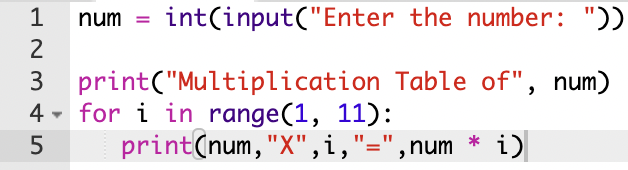
6. Times table input ranges Open a new Python editor and use inputs, range and print to program printing of a times-table.
Challenge Can you combine the interactive inputs task above with this one to ask the user to choose a times table and then print the times table they have chosen?
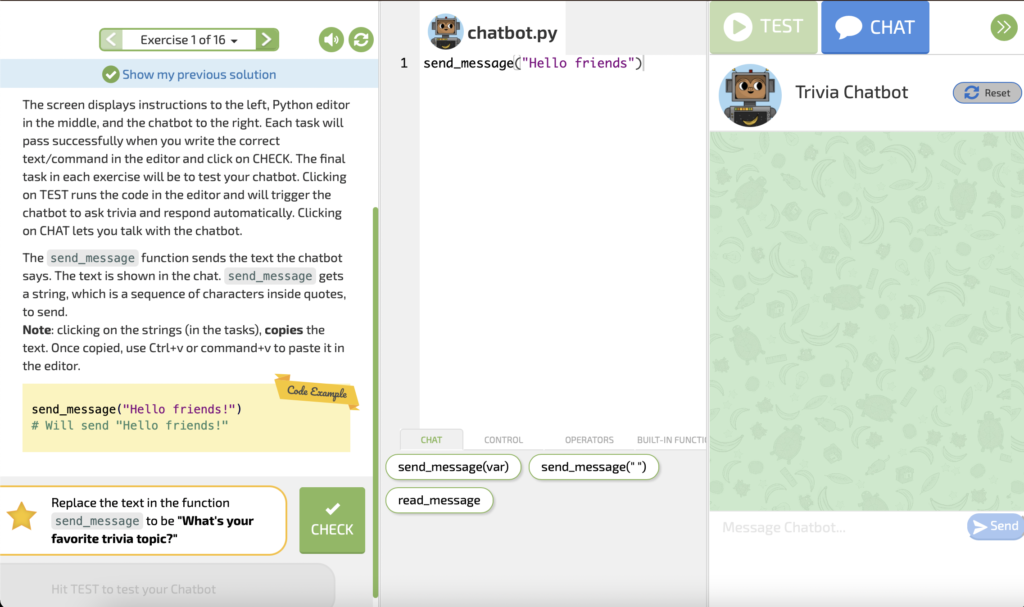
Trivia Chatbot Challenge Try to use the send message function to create an online chatbot. Open the Trivia Chatbot website and read the instructions for each exercise down the left side. Try the task next to the star by typing it into the editor in the middle of the screen and testing it on the right side of the screen. You can click the green check button to see if you are correct and then go onto the next exercise.
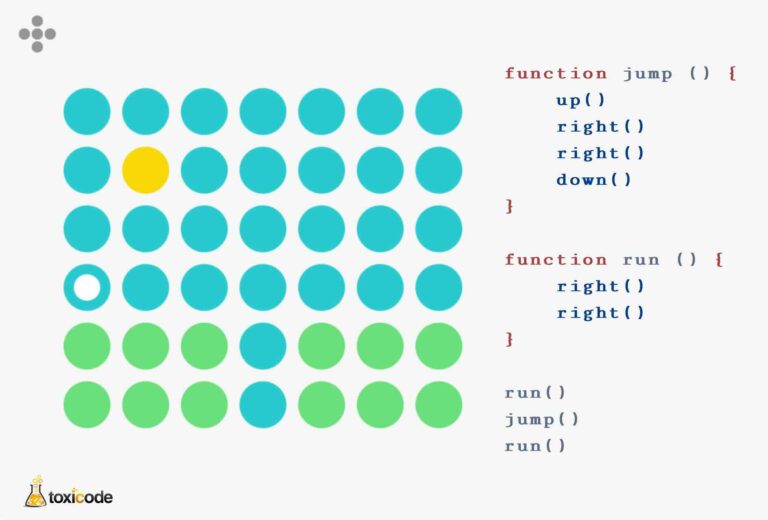
Toxicode Challenge Try the different challenges on the Toxicode website. Read the Python code and use the arrows on your keyboard (or swipe left, right, up or down on an iPad/touch screen) to move the white circle on the correct path. The levels get more difficult moving onto using loops and then functions (a piece of code to carry out more than one task scubas the function ‘Jump’ in the example below).