Watch the video above to learn about computer inputs (and outputs)

Scratch Control Activity Pack

🛠 What will you need?

The Scratch website. It is free to use and works on all devices.

What will you learn?
How to program keyboard inputs (or touch screen inputs) to control the sprites in different ways. We will also add loops to control a moving sprite. 

Why?
Programming inputs allows users to interact with your program. For example, controlling a car driving left and right or a football moving forwards or backwards.
1. Up, down, left, right
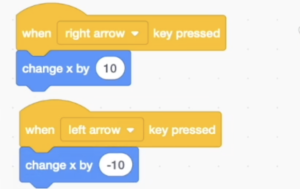
Use the when key pressed code block to write a program to move your sprite left and right using movements along x-axis.
How could you then move the sprite up and down? 
Save your project when you have finished.

Touch screen inputs (iPad or tablet only)
If you are using a tablet such as an iPad then use the second video to learn how to program touch screen inputs to control your spite. 

Costume challenge
Watch the video to learn how to switch the costume of your sprite so it faces the correct way when the arrow keys are pressed.

2. Movement on loops
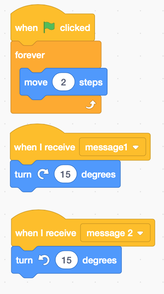
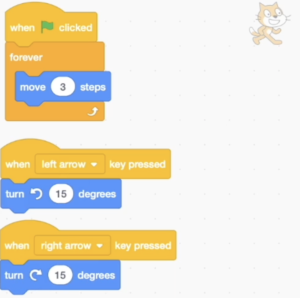
In some games we want the sprite to continually move, such as a racing game. Use the turn code block in movement and the forever loop to write inputs to control a continually moving sprite. You will need to start a new project in Scratch for this.

Challenge

Could you add another sprite to the same project and program it to move the same way but using different keys over the other side of the keyboard?

Touch screen
For touch screen inputs, you can adapt the program you made in the previous task above by adding a moment loop into the cat sprite (or sprite that is moving) and then add turns instead of movements by x and y. Use the image to help you. 

Challenge: Jumping

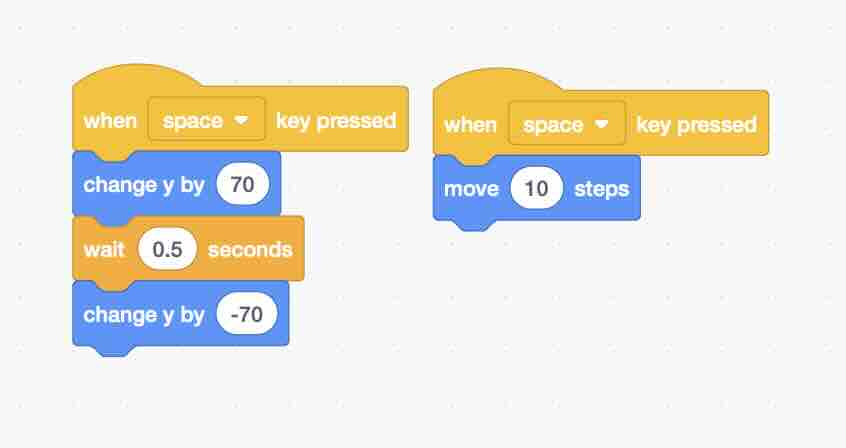
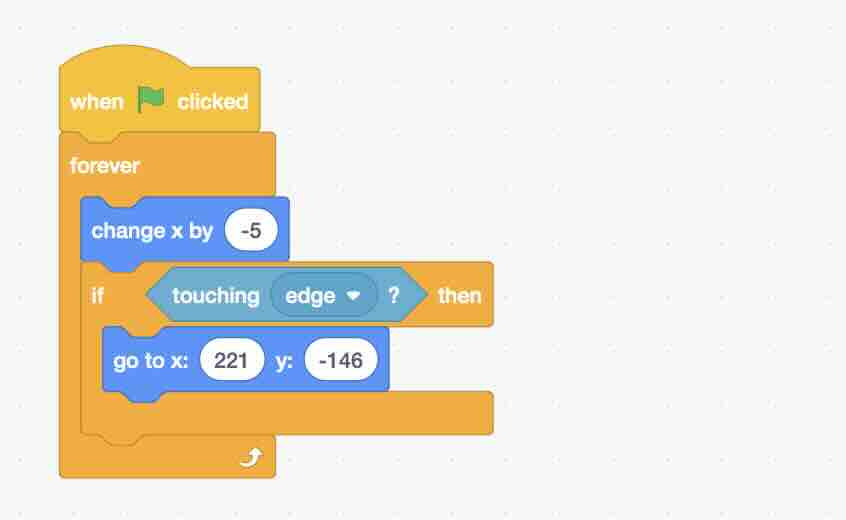
Watch the video and use the code below to program a game where a sprite can jump over another sprite using inputs, loops, selection and sensing.

How you could improve it?
– Could you program your jumping sprite that if it touch the sprite it jumping over then goes back to the left side of the screen?
– Could you add more sprites to jump over?
– Could you animate the jumping sprite by changing the costume?